Inventory
Understand inventory records, items, batches, lab data, product links, history, lifecycle states, and available stock.
Updated Sep 17, 2026 Source reviewed Sep 17, 2026 3 minute read
For: inventory teamsoperationscompliance
Overview
Inventory is the stock layer behind the Higher Origins catalog and sales workflows. Teams can create and maintain inventory directly, connect it to products, use batch and lab information in labels, and review availability while preparing menus or orders.
Products describe what a business offers to buyers, while inventory records the items, quantities, lots, batches, and compliance details available to support that offer. An optional third-party integration can supply some inventory records, but it is not required to use Higher Origins.
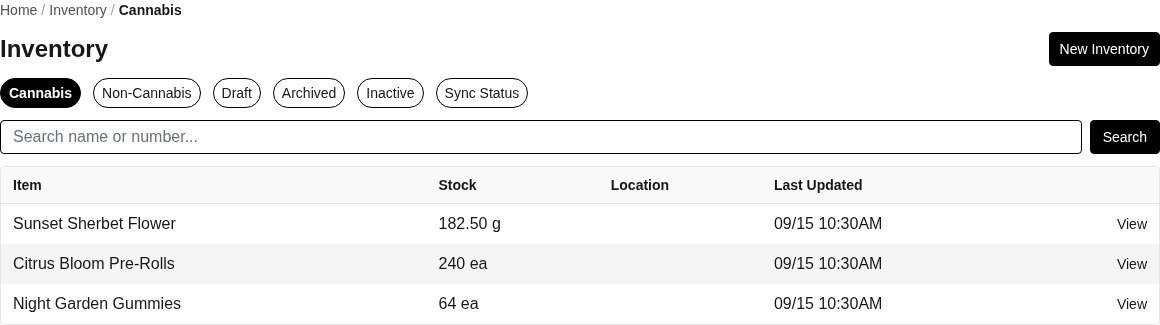
Use Inventory to find stock, separate cannabis and non-cannabis records, review lifecycle states, and inspect optional integration sync status when connected.
Open Inventory for the selected business.
Inventory lists
Cannabis contains regulated inventory records.
Items provides item-level stock information.
Draft contains inventory still being prepared.
Archived retains records removed from ordinary active use.
Inactive contains inventory that is no longer active but may be eligible for reactivation.
Sync Status shows import and update results when a supported third-party inventory integration is connected.
Create and edit inventory
Choose New Inventory to create a record and enter the identity and stock information requested by the form. Open a record to use Overview, Items, and History. Edit changes the inventory-level details. Delete follows the inventory removal workflow; Reactivate returns an eligible inactive record to active use.
Deleting or unlinking a relationship is different from deleting stock. Unlink Product keeps the inventory record and removes its catalog connection. Deleting an inventory item removes that tracked item subject to the application's rules.
Product links
Link Product associates inventory with a catalog product so quantities and compliance information can participate in sales and merchandising. The product workflow can also search inventory items and link or unlink them. If a product shows no available stock, confirm the correct business, product, variant, inventory record, and item relationship.
Items, lab tests, and batches
Edit an item to maintain its saved item information. The item table can show lot, status, stock, linked product, potency, compliance state, COA availability, costs, and received information.
Delete Item removes an eligible item after confirmation.
Lab Tests opens the lab results recorded for an item or synchronized package.
New Batch records batch or certificate information for an item. Edit Batch updates an existing batch.
Batch details can include cannabinoid and terpene values, lab test date, package date, certificate or COA, and a compliance state such as Pending, Passed, Failed, or Expired.
History
History brings together movements, lab tests, and batch activity for the inventory record. Use it to understand how quantities and compliance details changed rather than relying only on the current totals. Records synchronized from an external system can have a different source and update path than manually entered records.
Common problems
If a product is not connected, use Link Product or the product's Inventory tab and confirm you selected the intended item.
If potency or compliance looks incomplete, inspect the item's lab tests and batch or COA record before editing the product.
If a record appears under an unexpected lifecycle tab, inspect its status and reactivate it only when it should return to use.
Focused guides
Create a product, add variants, and link available inventory: connect existing stock to a sellable catalog product
Related resources
Products: connect stock to the customer-facing catalog
Metrc integration: optionally import supported facilities, packages, lab data, and transfers
Transfers: review regulated movement records and their order relationships
Orders: understand the separate commercial workflow for sellable products
Account and business: manage the selected business, facilities, teammates, and settings