Trading Partners
Manage prospects, active partners, contacts, pipeline stages, activity, tasks, routes, pricing, licenses, and compliance.
Updated Sep 17, 2026 Source reviewed Sep 17, 2026 4 minute read
For: sales teamsaccount managersoperations
Overview
Trading Partners is the relationship layer between cannabis businesses. It combines organizations, contacts, license context, pipeline stages, tasks, activity, pricing, shared menus, orders, and conversations so a marketplace discovery or buyer lead can become an ongoing account.
Marketplace and Insights help find businesses or demand. Trading Partners stores the reviewed relationship and follow-up work, while Menus, Orders, and Messages handle the offers, transactions, and conversations that follow.
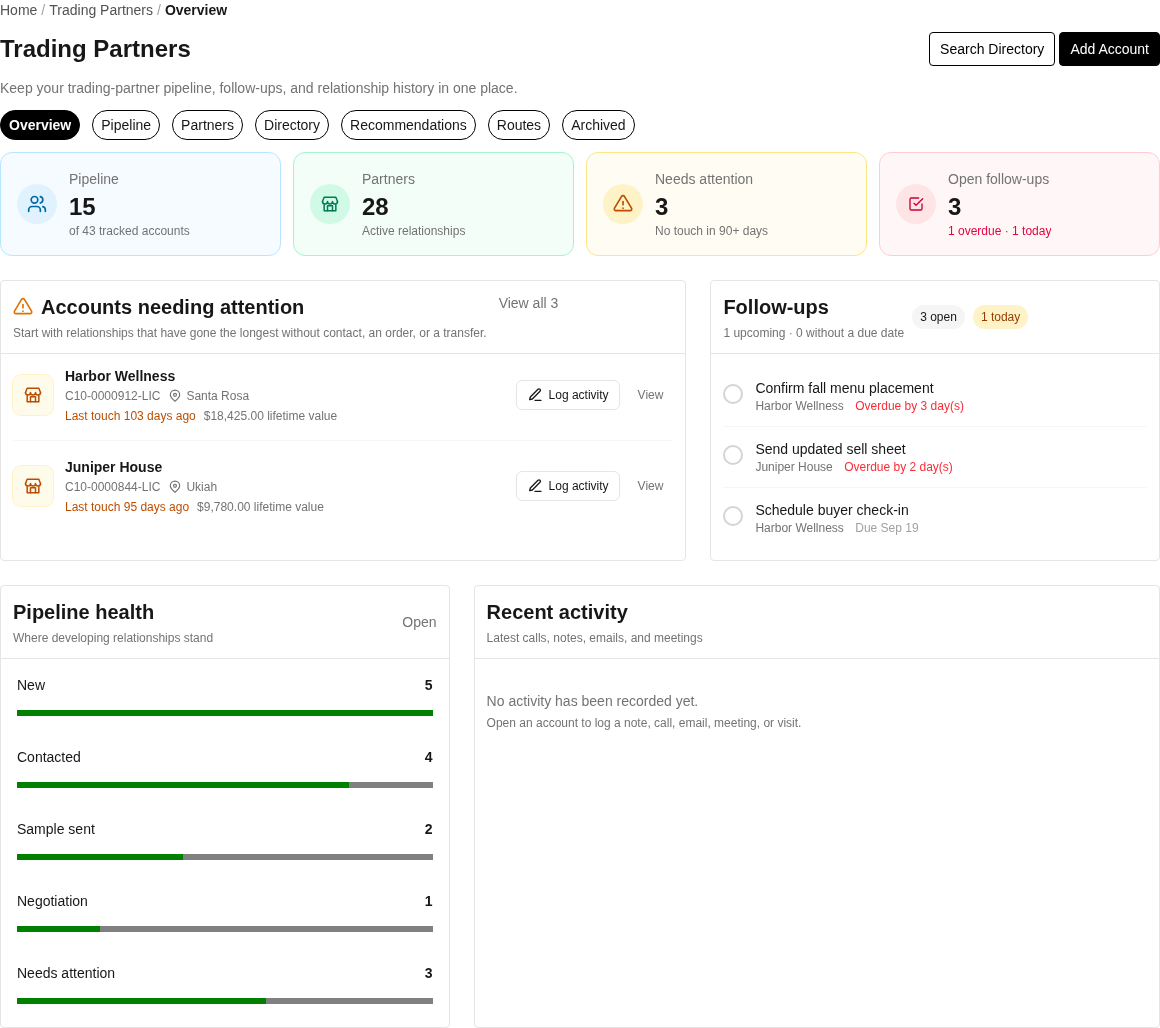
The Trading Partners overview highlights relationship health, pipeline stages, and follow-ups that need attention.
Open Trading Partners for the selected business.
Main views
Overview summarizes the pipeline, follow-ups, and recent history.
Pipeline groups accounts by relationship stage.
Partners contains active relationships.
Directory searches licensed retailers and supports manual additions.
Recommendations ranks retailers where your brand appears absent using available traits, distance, menu confidence, and freshness.
Routes organizes territories, recurring runs, stops, tasks, and activity.
Archived contains inactive, lost, or disqualified relationships.
Recommendations and route recommendations require Membership. They are evidence for review, not confirmation that a retailer wants contact or that its current assortment is complete.
Create a partner or prospect
New Trading Partner creates a relationship manually.
Directory and prospect detail can add a licensed business as a lead.
Add as Lead saves the prospect to your pipeline. Disqualify removes an unsuitable prospect from active consideration; Requalify returns it with the selected reason or stage.
Add to Route places an eligible prospect into a sales route when your account has access.
Stages and status
The pipeline uses New, Contacted, Sample Sent, Negotiating, Partner, Needs Attention, and Lost concepts. Moving to Partner activates the relationship; moving to Lost archives it. Changing away from an active stage can adjust relationship status. Use the Vibe control as a quick account sentiment signal, and preserve concrete context in notes and activity.
Partner detail
Overview shows identity, stage, follow-up context, and summary information.
Contacts creates and edits people, and Make Primary selects the main contact. The first contact is made primary automatically.
Orders opens transactions with the partner and can start a new order.
Activity logs calls, meetings, emails, or other touches. Edit Activity corrects an entry; Add Note records relationship context.
Tasks creates dated follow-ups. Presets include Follow Up, Provide Samples, Schedule Meeting, Send Invoice, Check In, and Collect Payment. Complete marks a task done; Delete removes it.
Pricing adds, edits, or deletes product price overrides for this relationship.
License and Compliance show licensed identity and saved compliance contact information. Authorized users can update the contact details used by the relationship.
Send a menu
Send Menu opens the menu email workflow for a trading partner. Preview the email before sending, confirm the recipient and menu, then send through the supported control. The activity trail can help the team coordinate follow-up.
Routes
Create Route defines a sales route or territory; Edit changes its details.
Add to Route and Bulk Add place partner stops on a route. Remove Stop takes one stop off without deleting the partner.
Route detail presents stops, tasks, and activity. Location data supports the map, while Membership recommendations can suggest additional prospects.
Common problems
If an account is absent, search Directory and Archived before creating a duplicate.
If a recommendation is stale, check its evidence and freshness and verify the retailer before adding it.
If an order uses an unexpected price, inspect partner and product pricing overrides.
If a team member cannot edit a contact, stage, task, or price, confirm the selected business and use Report an Issue so Higher Origins support can review the missing action.
Focused guides
Add an account to your pipeline: start from the directory or a known license
Search California cannabis licenses: research and verify a license before outreach
Related resources
Marketplace: discover businesses and buyer demand
Insights: turn market opportunities into reviewed prospects
Menus: prepare and send a shareable offer
Orders: work with transactions and partner-specific pricing
Communication: continue conversations and coordinate event follow-up