Your Page
Manage your public business identity, About content, links, gallery, contacts, subscribers, and visual settings.
Updated Oct 22, 2026 Source reviewed Oct 22, 2026 4 minute read
For: business ownersbrand managersmarketing teams
Overview
Your Page is the public identity for the selected business. It brings together the business description, rich About content, website and social links, gallery images, public contacts, subscribers, and visual settings. Marketplace profiles, event ownership, and public discovery can refer to this page.
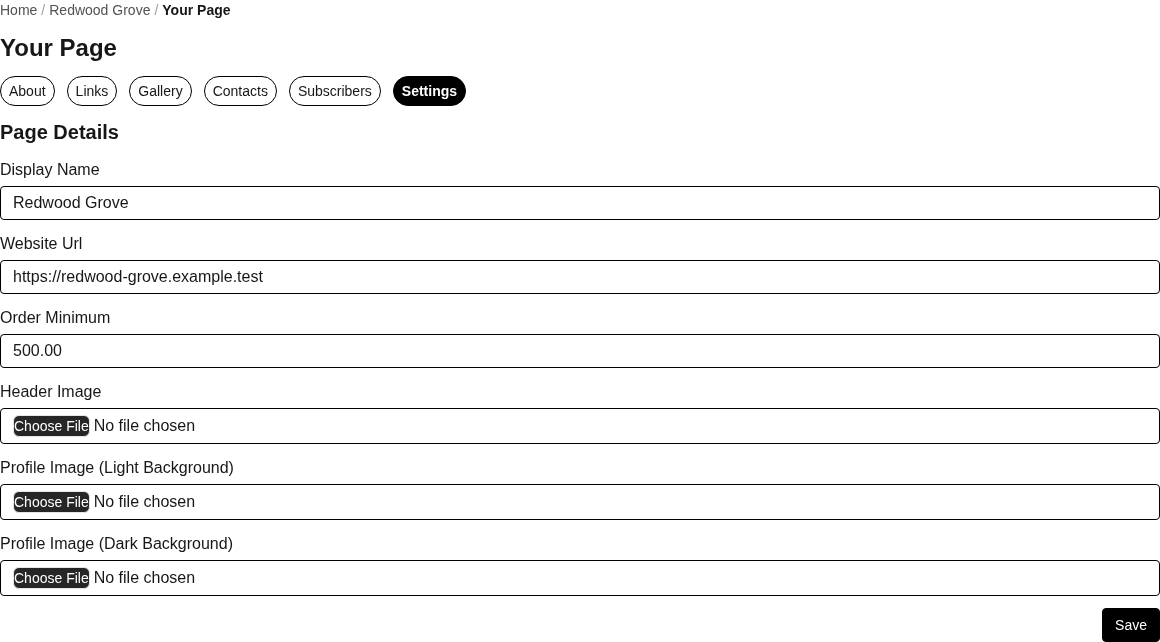
Your Page settings control the selected business's public identity, website, order minimum, and page images.
Open Your Page for the selected business.
Contacts, Subscribers, Links, and Gallery show 50 entries at a time. Use Previous and Next within the selected tab to browse more. Contact exports retain the complete collection.
About
About edits the short Description and the richer About content shown on the public page. Use Save after reviewing both. Keep customer-facing claims current and avoid placing private business or compliance information in public content.
Links
Copy the public links URL when you want to share the page's link collection.
Add Link records a title and URL. Titles support up to 120 characters and URLs up to 2,048 characters.
Edit Link updates a saved destination. Delete removes it from the page.
Drag to reorder links, then save the order. Higher Origins normalizes the URL while preserving case-sensitive path, query, and fragment content.
If another teammate changed the list first, Higher Origins can reject an outdated reorder. Refresh the page, confirm the current list, and apply the order again.
Gallery
Upload one or more images to add them to the public gallery.
Open an image to preview it.
Drag images to change their order and save the new sequence.
Remove deletes the selected gallery image after confirmation.
Gallery previews load as you scroll. Open an image to inspect it before changing or deleting it.
Reorder the links or images shown on the current page, then save the order. Entries on other pages keep their relative order. At a page boundary, use the move controls to move an entry to the neighboring page. If the collection changed while you were editing, reload the page before trying the reorder again.
Contacts
New Contact creates a page contact. Edit maintains the person's name, role, job title, email, work and mobile phones, website, address, Instagram, LinkedIn, note, and Public toggle. Message Contact opens the conversation path. Export vCard downloads contact details for an address book. Only turn on Public when the person and information should appear to page visitors.
Subscribers
Subscribers lists the email address, postal code, and subscription time recorded for people following the page. It is a review view; use the supported communication and email preference workflows rather than changing subscription records directly from the table.
Settings
Settings changes the display name, website URL, order minimum, header image, and light and dark profile images.
Watch Page and Unwatch Page controls used from supported discovery views follow or unfollow page activity for the signed-in user.
Share the page
Use View Public Page to inspect the business page and copy its browser URL. The current Your Page workspace does not expose a downloadable page QR code. QR controls available in Menus or Studio create destinations for those resources and should not be described as a public-page QR action.
Common problems
If the page looks wrong publicly, confirm the selected business, saved display settings, and the public status of individual contacts.
If an image crops poorly, use an image suited to the header or profile position and review both light and dark profile variants.
If a link fails, open the saved URL directly and preserve any required case-sensitive path.
Focused guides
Edit your public page: update About content, visual settings, and public business details
Add and organize page links: maintain public website and social destinations
Related resources
Products: maintain the catalog associated with the public business identity
Marketplace: see how the business profile appears during discovery
Communication: manage associated events, messages, and audience activity
Studio: create branded assets that use page and business data
Account and business: manage the owning business and Where to Buy embed settings