Create and share a menu
Build a cannabis wholesale menu, add products and variants, control visibility and pricing, and share it by link, PDF, or QR code.
Updated Sep 17, 2026 Source reviewed Sep 17, 2026 2 minute read
For: sales teamsbrand managersbusiness owners
Create the menu
Open Menus and choose New Menu. Enter a buyer-facing name and a short description. A new menu starts Unlisted so you can prepare it before broader distribution.
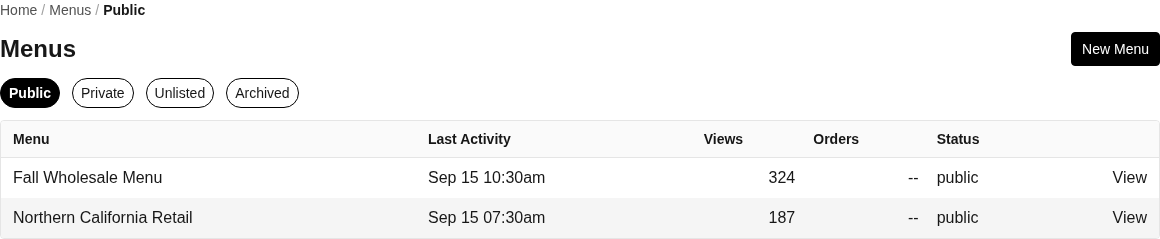
Menu visibility tabs keep public, private, unlisted, and archived catalogs distinct.
Add products
Open the menu and choose Add Product. Select the products you want to offer. Higher Origins adds all current variants for a selected product, so review the resulting list and remove or adjust anything that should not be offered through this menu.
Review each variant
Open a menu product to review its variants. The management screen can store a menu price override, but the current licensed-buyer view recalculates exact buyer, then regional, then base pricing and can ignore that override. Confirm the buyer-facing price with Open Menu before sharing.
A menu is an offer assembled from product and variant records. Updating the menu does not replace careful maintenance of the underlying product and inventory.
Choose visibility
Public, Private, and Unlisted organize the seller's Menus tabs; choosing a status applies it immediately.
Each current direct link reaches the same California facility-license gate. These statuses do not add a password, seller approval, or contact gate.
Archived is shown as a lifecycle status, but Settings does not expose an Archive control and status alone does not stop direct-link access. To revoke the route, use Delete Menu in Settings > Danger Zone after exporting anything you need to keep.
Open the finished buyer view before distributing it. Test it in the same access context your intended buyer will use, especially after changing visibility.
Share and export
Open Menu previews the customer-facing offer.
Copy Link places the menu URL on the clipboard for direct sharing.
Export PDF creates a portable version for review or distribution.
Download QR creates the code for printed or digital materials. Scan it with a phone before distribution.
The free plan can limit a business to one menu. If Higher Origins reports that limit, reuse the existing menu or review Membership before creating another.
Related guides
Menus: understand visibility, requests, insights, exports, and menu recovery
Create and publish a product: prepare the products and variants a menu uses
Place an order from a menu: see the buyer's ordering workflow
Orders: manage a submitted menu order